Send Anywhere – Easy, quick, and unlimited file sharing

Over 10 million users worldwide trust Send Anywhere to transfer files quickly, securely, and without complicated steps.
Whether you’re sending photos, videos, apps, documents, or large files, Send Anywhere makes the process simple and incredibly fast.
With its high-speed transfer technology, you can share files across devices in seconds — no cables, no compression, and no quality loss.
It works seamlessly across platforms, allowing you to send files between Android, iOS, Windows PC, and Mac without limitations.
You can free download and install Send Anywhere on your smartphone or computer and start transferring instantly.
The app is lightweight, easy to use, and designed for anyone who needs reliable file sharing anytime, anywhere. If you’re looking for an alternative file sharing platform, Xender is also a popular option that allows fast and convenient file transfers across multiple devices
App Details
Developer: Rakuten Symphony Korea, Inc.
- Initial Release: 17 October 2012
- Platforms: Android, iOS, Windows PC, Mac, and Linux
- Total Downloads: 50 Million+ worldwide
- License: Free (with optional in-app purchases)
Key Features of Send Anywhere
Send Anywhere is designed to make file sharing simple, fast, and completely secure. Whether you’re sending personal photos or important work documents,
the app keeps everything smooth and reliable.
Transfer Any File Type Without Quality Loss
With Send Anywhere, you can transfer any file type — photos, videos, music, documents, apps, and more — without compressing or altering the original file.
Your data stays exactly the same, with no quality reduction.
Simple 6-Digit Key for Instant Transfers
No complicated setup. No account required. Just generate a one-time 6-digit key, enter it on the receiving device, and your file transfer starts immediately.
It’s one of the fastest and easiest ways to share files between devices.
Wi-Fi Direct – No Data or Internet Needed
Need to send files without using mobile data? Send Anywhere supports Wi-Fi Direct, allowing you to transfer files offline.
This makes it perfect for large files when you don’t want to use your data plan.
Easy Link Sharing Across Social & Messenger Apps
You can create a shareable link and send it through WhatsApp, Messenger, Telegram, Email, or any social media platform.
The recipient simply clicks the link and downloads the file — quick and hassle-free.
Advanced 256-bit File Encryption
Security matters. That’s why Send Anywhere uses 256-bit encryption to protect your files during transfer. Your data remains private and secure from start to finish.
How to Send Files Using Send Anywhere
We’ve all been there — trying to send a large video, an important document, or a bunch of photos, only to run into file size limits or compatibility issues.
It used to be frustrating. Cables didn’t match. Email wouldn’t allow large attachments. Bluetooth was painfully slow.
That’s exactly where Send Anywhere changed the game.Instead of complicated setups and restrictions, Send Anywhere gives you a fast, secure,
and incredibly simple way to transfer files between devices — whether it’s Android, iPhone, PC, or Mac.
Step 1: Install the App
First, download Send Anywhere on both devices — the one sending the files and the one receiving them.
It’s available for Android, iOS, Windows, Mac, and even Linux. Installation takes less than a minute. Once installed,
open the app and allow it access to your files so it can work properly. No account creation is required, which makes things even easier.
Step 2: Choose What You Want to Send
On the sending device:
Immediately, the app generates a unique 6-digit key and a QR code. This key works for 10 minutes and keeps your transfer secure.
Step 3: Receive the Files
Now, on the receiving device:
That’s it. The transfer starts instantly.
Step-by-Step: How to Receive Files in Send Anywhere
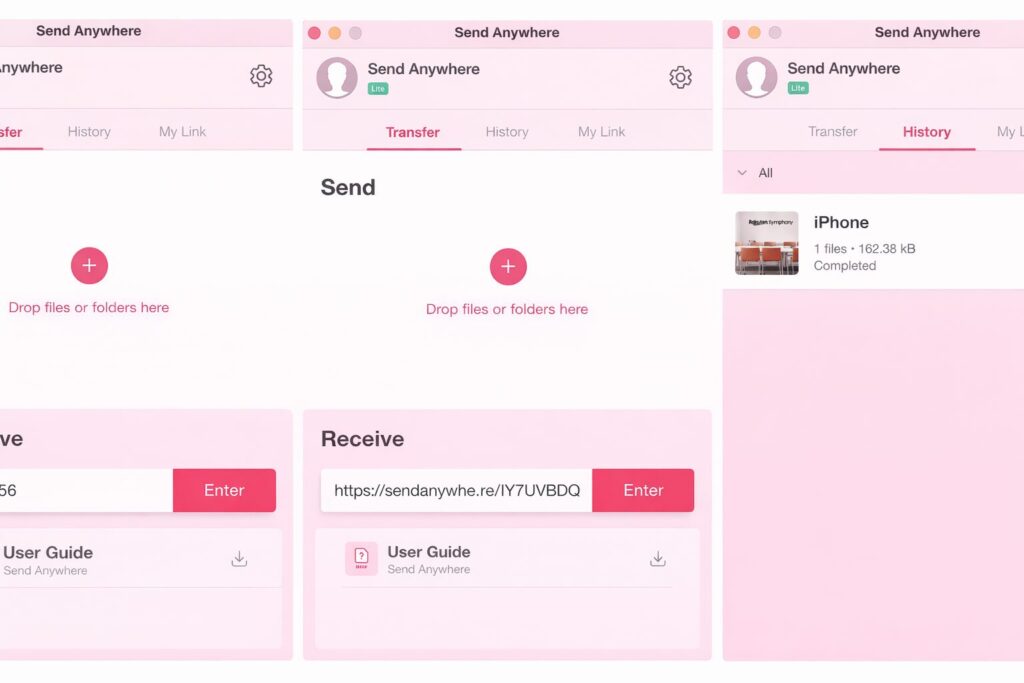
Step 1: Install Send Anywhere
Step 2: Tap the “Receive” Option
Once the sender shares a 6-digit key:
Step 3: Start the Transfer
After entering the correct key:
Receiving Files Between Different Devices
One of the best things about Send Anywhere is that it works across multiple platforms without compatibility issues.
Android to Android
Android to iPhone
Phone to PC or Mac
Receiving files on a computer is just as easy:
Why Choose Send Anywhere for Receiving Files?
Millions of users prefer Send Anywhere because it offers:
Cross-Platform Compatibility
Works with Android, iOS, Windows, Mac, and Linux.
Fast Transfers
Even large files move quickly, especially using Wi-Fi Direct.
Strong Security
All transfers use 256-bit encryption and temporary keys.
Final Thoughts
Receiving files doesn’t have to be frustrating or complicated. With Send Anywhere, the process is secure, fast, and incredibly simple.
Whether you’re transferring personal photos, business documents, or large media files, Send Anywhere gives you a reliable solution
that works across devices without restrictions. You can learn more about Send Anywhere from the website. It’s available for Android and .

Benedict
This is the best app all time to share data. It is more convenient to share large data. I appreciate the developer of the app to create the best data sharing app.
Hawthorne
This app is very easy to use for transfer my data into computer, it made my life so easy. It has a built-in function so I am using it for sharing my audio files too.
Huxley
This is such an amazing app for data sharing . I am using this app more frequently to share my data without any cable and without using my data connection.
Tennyson
I must say I am in love with this app. It actually saves my time and it transfers my large data from old device to new device so quickly sometimes without internet.